On a real Mac, 96% full
Know what’s safe to delete before you delete it.
Each thing says what it is, when it was last used, and exactly what happens if it goes. You tick what you want gone. Nothing moves until you press the button.
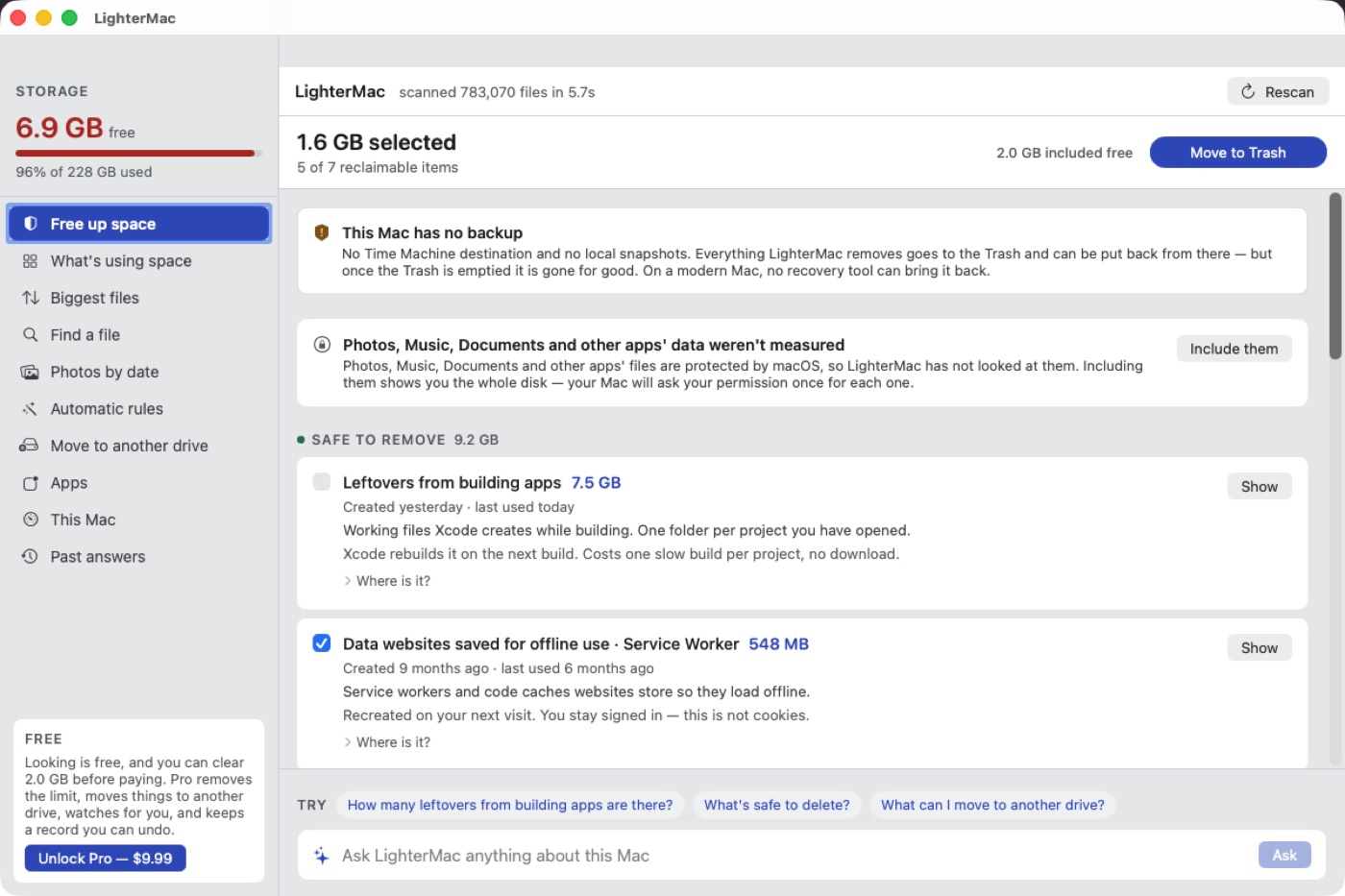
Most of it you never saved: System Data, an old iPhone backup, years of Messages photos, Time Machine snapshots, forgotten Downloads. LighterMac names every one and ticks only what rebuilds itself. Anything of yours waits for your tick, and goes to the Trash.
DaisyDisk shows it. LighterMac explains it — and gives it back safely.
This is the bar in System Settings → General → Storage. Tap System Data.
146 GB, named
Not on a Mac? Get one email when LighterMac is ready for Windows or Linux.
We never see your files. They, their names and their folders never leave your Mac. The app sends only anonymous counts (sizes as ranges, a random ID) — and you can turn those off.
“My Mac is full and I have nothing on it.”
LighterMac draws the whole disk to scale, hidden folders included, and names every block. The space you can't find is usually in folders Finder never shows you.
Why a Mac fills up with nothing on it →“System Data is over 100 GB.”
It opens System Data into things with names: Time Machine snapshots, browser and chat caches, caches hidden in /private/var/folders, app leftovers. Each says what happens if it goes.
What System Data really is →“I deleted things and the space didn't come back.”
It measures free space before and after, and tells you the real number. When you want the space for good, it empties only what it moved.
Why deleting doesn't free space →“It fills up again every few weeks.”
It watches the disk and warns you before it's full. If you want, rules clear the things that rebuild themselves: to the Trash for a day, then for good.
Why Mac storage keeps filling up →“Finder and Settings show different free space.”
It shows both numbers side by side and explains the gap: purgeable space macOS promises but hasn't freed yet.
What purgeable space means →“I pay for iCloud. Why is my Mac still full?”
It never deletes from iCloud Drive, because deleting there deletes everywhere. It shows you the rest of the disk, where the space usually went, and the page shows the safe iCloud fix.
Why iCloud still uses your Mac's storage →Each thing says what it is, when it was last used, and exactly what happens if it goes. You tick what you want gone. Nothing moves until you press the button.
The fear with any cleaner is that it takes something of yours while you are not looking. These three rules make that impossible, not just unlikely.
Your Photos library, documents and apps are never offered, and no rule can name one. Things that are yours but forgotten — Messages attachments, chat photos, old downloads, an iPhone backup — are listed so you can see them, never ticked for you, and only ever go to the Trash.
Caches that rebuild themselves are deleted for good when you press Free — that is what gives the space back, and the button says so. Anything that would not come back by itself goes to the Trash first. What a rule clears stays in the Trash for a day, then goes for good; on a nearly full disk it doesn’t wait.
When you want the space for good, LighterMac removes only the items it moved, never the rest of your Trash. Emptying your whole Trash is a separate button: free, and never counted toward the 2 GB.
The app reads your disk on your Mac and nowhere else. It has no account. It asks once a day whether there is a newer version, and sends anonymous counts of what happened — opened, scanned, cleared, sizes only as ranges like “10–20 GB” — so we can see where it falls short. One switch in Settings turns those off. (This website counts visits and downloads — what that means.)
16.1 GB
Dragging Docker to the Trash removes 2.4 GB. Its container file stays. LighterMac removes an app with everything it left, and finds leftovers of apps you deleted years ago.
22.1 GB
Some of the biggest things are ones you still need. LighterMac moves them to another drive and leaves a link, so everything still finds them. It tests the drive first.
35 → 9 GB
Free space fell from 35 GB to 9 GB in eight weeks, after a cleanup. LighterMac watches the disk and tells you before it becomes a problem.
Keep it light for $9.99, once. No subscription.
$0
Forever. No trial clock.
Your files never leave your Mac.
$9.99one payment
Everything in Free, plus:
Everything macOS can't file under Apps, Documents, Photos or the other named categories: app caches, logs, browser data, chat app files, container disks like Docker's, developer folders, and macOS's own working files. It used to be called Other. What's usually inside →
It never picks anything of yours. Your Photos library, documents and apps are never offered, and no automatic rule can name them. Messages attachments, chat photos, old downloads and iPhone backups are listed so you can see them, but never ticked for you, and they only ever go to the Trash. Caches that rebuild themselves are deleted for good when you press Free, and the button says so. Anything else goes to the Trash first, so you can put it back.
DaisyDisk shows you what is big. LighterMac also says what each thing is, whether it comes back by itself, and what you would lose if it went — then ticks only what is safe. It covers what a mainstream Mac fills up with: System Data, Time Machine snapshots, iPhone backups, Messages and WhatsApp photos, old Downloads. And if you would rather not use an app at all, Apple menu → System Settings → General → Storage shows the same totals for free.
It never touches it: it may be the only copy of your photos. It measures the library and, if it's big, shows how to turn on Optimize Mac Storage in Photos → Settings → iCloud, which keeps full-size originals in iCloud and frees the space by itself.
The Trash is on the same disk, so moving something there frees nothing until it's emptied. LighterMac measures free space before and after and shows you the real number. More →
It shows how much space local Time Machine snapshots hold, and Pro can thin them with Apple's own tmutil. It never deletes anything in iCloud Drive, because deleting a synced file deletes it everywhere. How to free iCloud space safely →
Your files, their names, paths and folders never leave your Mac. The app sends your licence key when you activate Pro, a daily “is there a newer version?” with nothing attached, and anonymous usage counts — with sizes only as ranges, like “10–20 GB found” — that you can switch off on the first-run card or in Settings. The full list →
No. $9.99 once. It won't charge you again.
Everything about seeing: the whole disk, every item explained, biggest files, search, and your first 2 GB cleared. Emptying your Trash is free and never counts. Pro removes the limit and adds Time Machine snapshot thinning, uninstalling, moving to another drive, the watch and rules.
Right-click the app and choose Open. If macOS still refuses, go to System Settings → Privacy & Security and choose Open Anyway. You only do this once.
Yes, within 14 days, no questions. Email hello@lightermac.com.
Not on a Mac? Get one email when LighterMac is ready for Windows or Linux.
We never see your files. They, their names and their folders never leave your Mac. The app sends only anonymous counts (sizes as ranges, a random ID) — and you can turn those off.